Rhinoceros 3D
models the shape of a mechanism and knows nothing about how it moves — no constraint
solver, no assembly mates, no mechanism automation. RhinoChelae adds them.
No constraint solver and no assembly mates — parts have no relationship to each other
Motion is faked with copy, rotate and repeat: one pose at a time
Nothing stops two solids from occupying the same space
Change one arm and every position has to be rebuilt by hand
Interference found late — often on the shop floor
Rhino with RhinoChelae
Constrain it, then grab it.
Parts are tied to each other the way they are on the real machine
Drag any part and the whole assembly solves live
Linkages that close back on themselves work without special setup
Motion respects physical limits instead of passing through them
Edit the geometry; everything stays connected
Constraints
Constrain it, then drive it.
Mechanisms, not poses
Parts stay connected to each other, so moving one moves the whole assembly the way the real thing would.
Driven, not animated
Motors and struts do the driving. You set what pushes and how far — the mechanism works out every position in between.
Aware of solid matter
Motion stops where two parts meet, and parts can carry each other by shape alone — no joint required.
A lid on a gas strut
Push the strut open and the lid follows the arc it would follow in the workshop.
A crank through a full turn
Turn one arm and the rest of the linkage comes along, as it must.
Physical limits
Mechanisms that react to solid matter.
Six links and not one joint between them. The gold link is anchored; the rest are
held by the shape of the metal alone, and follow when the free end is pulled.
A constraint says how parts are connected. Collision says where they cannot go.
Both are needed before a simulated mechanism tells you anything about a real one.
So motion stops where two parts meet, parts can rest on and push each other with
no joint between them at all, and an assembly cannot be pushed through itself.
The mechanism runs into the same walls the built one will.
Motion & output
Animate it on a timeline — or just drag it.
Dragging is for exploring: grab a part and feel where the mechanism reaches and where
it binds. The sequence editor is for showing: put several moves in order and let the
whole thing run — and record it as a video when it looks right.
WireframeShadedRendered
The clip looks like your viewport looks — wireframe for a review, rendered for a client —
and it comes out smooth even when the display mode is a heavy one.
Interface
A Rhino panel, not a separate program.
One native Rhino tool panel — dock it where your other panels live, or float it on a
second screen. No export, no round trip, no second application to learn: the
mechanism lives in the same file as the geometry, and behaves like the rest of Rhino.
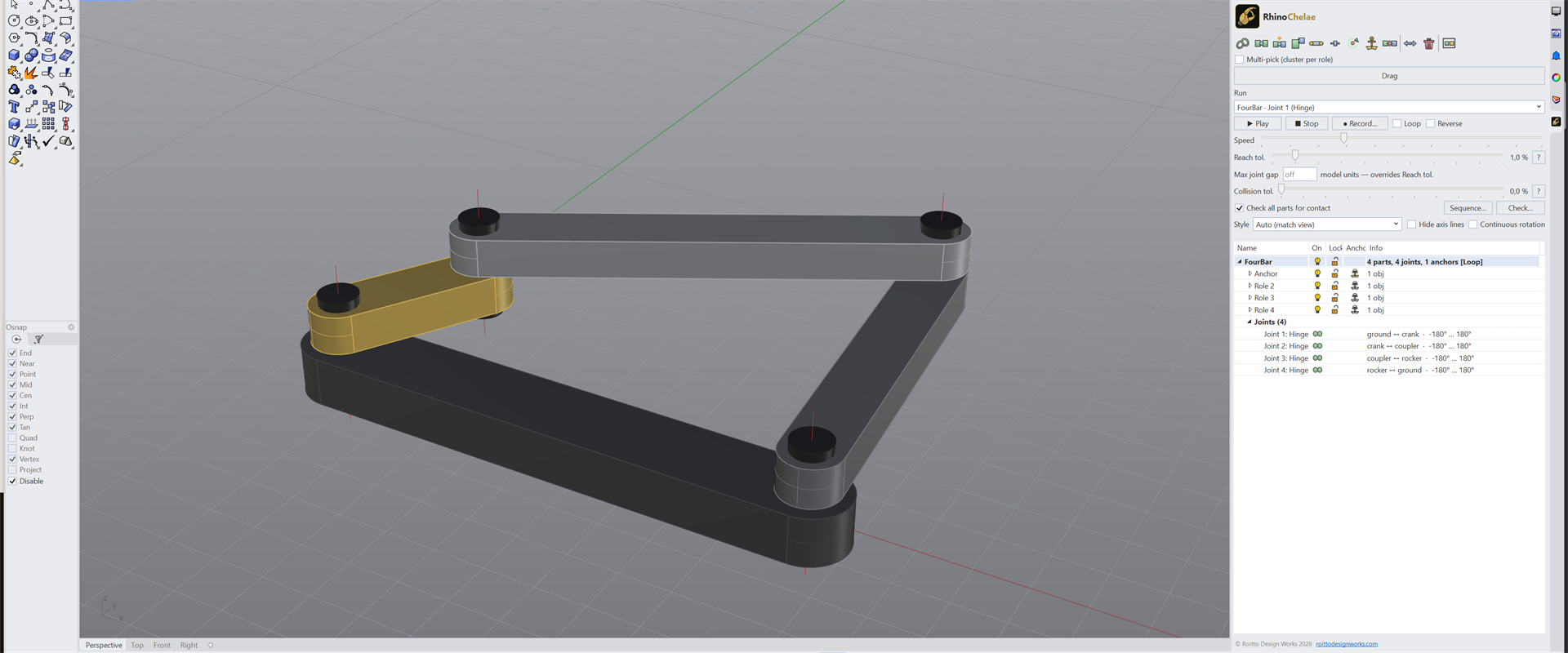
The panel docked in Rhino 8, with the four-bar linkage from the top of this page
listed in it.
Workflow
Built from what you have already drawn.
You do not model the mechanism again. The parts are your Rhino geometry and the axes
are lines already in the model — you say what is joined to what, anchor the frame,
and pull. Minutes, not an afternoon of rebuilding.
Who it's for
For anyone whose design has to move.
General-purpose mechanism design — the constraints do not care what industry the parts belong to.
Machine & equipment design
Furniture mechanisms
Marine equipment
Robotics & automation
Consumer product hinges
Architectural moving parts
Requirements
Technical details.
Platform
Windows — fully supported (Rhino 7 & 8). macOS — built to run on Rhino 8 for Mac; testing is still in progress, so full Mac support is not yet guaranteed.
Native Rhino plugin — runs independently, no Grasshopper required
Interface
One native Rhino tool panel — dockable or floating
Recording
MP4, in the display mode your viewport is already using
Persistence
Mechanisms are stored in the .3dm file and survive save, close and reopen
Licence
Subscription, monthly or yearly — every purchase carries a 14-day money-back guarantee
Release Notes
Full Release History
v0.11.2
Fixes
Playback and recording now follow the viewport's display mode exactly. While a run is on, the moving parts are drawn by Rhino itself, so Pen, Artistic, Technical and any mode you have customised look the same in motion as at rest. These modes used to show the moving parts as bare wireframe
Rhino 7: opening another file in the same session registered its mechanisms a second time ("Rotor 1 2" beside "Rotor 1"), which doubled every joint and could stop a run on a collision that was not there. Fixed
Pressing Play no longer marks a clean document as modified
Loop and Reverse are greyed out while a motion sequence is selected — they apply to single-motor runs only
A temporary display mode left behind by an interrupted recording is removed when the plugin loads
v0.11.1
Fixes
Playing a motion sequence showed nothing: every frame was solved, but the preview was never switched on, so the model sat in its rest pose until "Sequence finished". Single-motor runs were unaffected. Sequences now draw while they play, and recording them works the same way
v0.11.0
New Features
Video export built in — the encoder ships with the plugin, nothing to install separately
Recording can capture the render view, not just the shaded one
Rec settings and one-press Rec are now separate
Collision pairs can be set to Limit or Contact from the command and from the tree
Contact shapes listed in the mechanism tree, with the part and its curve highlighted
Remove a single joint from the tree — the parts stay in the mechanism
Video library with preview thumbnails
Fixes
A saved mechanism now loads even on a machine where the plugin has not been opened yet — saving from that state used to erase the setup
Parts no longer come loose when an object belongs to one part and is tagged as another part's child
Dialogs fit a small screen, including the licence activation window
Moving parts draw in the display mode you are in, instead of always using render materials
Recording walks to the first frame from the pose the mechanism is in, solves contact in sub-steps, and says why a frame was rejected
Meshing gears no longer jolt as the angle wraps at ±180°, and dragging is steadier in closed loops
Recording no longer leaves its PNG frames behind
v0.10.0
New Features
Gear ratio as a joint — meshing gears, belts, chain sprockets and internal gearing
Tooth profiles you model yourself
Built-in help window with searchable topics and examples
Contact-shape preview
Ratio readout after a run
Improvements
Faster contact solving
Steadier chains and struts in closed linkages
Playback matches interactive dragging
Continuous rotation on by default for unlimited hinges
Refined dragging and collision handling
v0.9.0
First public release
Parts and joints: hinge, slider, ball and fixed
Closed linkages solved as you drag, in the viewport
Collision limits that stop a mechanism where it should stop
Contact physics: parts held by shape alone, chains with no joint between the links
Motion sequences: several moves put in order, played back as one, recorded to MP4
Mechanisms stored in the .3dm file, surviving save and reopen
Pricing
From €15/month.
Monthly or annual subscription. 14-day money-back guarantee on every purchase.
RhinoChelae
From €15/month
All features included. Choose the cadence that fits you — €15/month, or €129/year and save 28%.
If you design things that move, tell us about the mechanism you need it to handle.
Happy to answer questions or take feature requests before you subscribe.