EN | FI
Now Available

Automated notch marks & seam allowances for Rhinoceros 3D

RhinoNotches automates the placement of notch marks, target marks, drill holes, and seam allowances on your flat patterns — a smarter workflow for pattern making directly inside Rhinoceros.

6
Notch Types
1-Click
Workflow
7 & 8
Rhino Versions
€19
From / month
V-Notch
I-Notch
T-Notch
U-Notch
External
Drill Hole

The Problem

Placing notch marks and target marks by hand is one of the most tedious steps in pattern making and preparation for sewing or CNC cutting.

  • Manually measuring and drawing each notch mark wastes hours per project
  • Inconsistent notch angles and depths cause alignment errors at the sewing table or cutting machine
  • Seam allowance offsets must be recalculated every time a pattern changes
  • Sharp corners and tight curves require special attention that is easy to overlook in pattern design

The Solution

RhinoNotches handles the entire pattern marking workflow in seconds, with precision you can trust for sewing, CNC, and laser cutting.

  • One command places all notch marks and target marks at once — correctly oriented with precise geometry
  • Six notch types (I, V, T, U, External, Drill Hole) cover every textile and canvas production standard
  • Automated seam allowances with variable widths — adjust the offset between any two notch points for hems, zippers, and seams
  • Smart corner detection skips sharp angles where notches would overlap or conflict in the pattern
Showcase

See It in Action

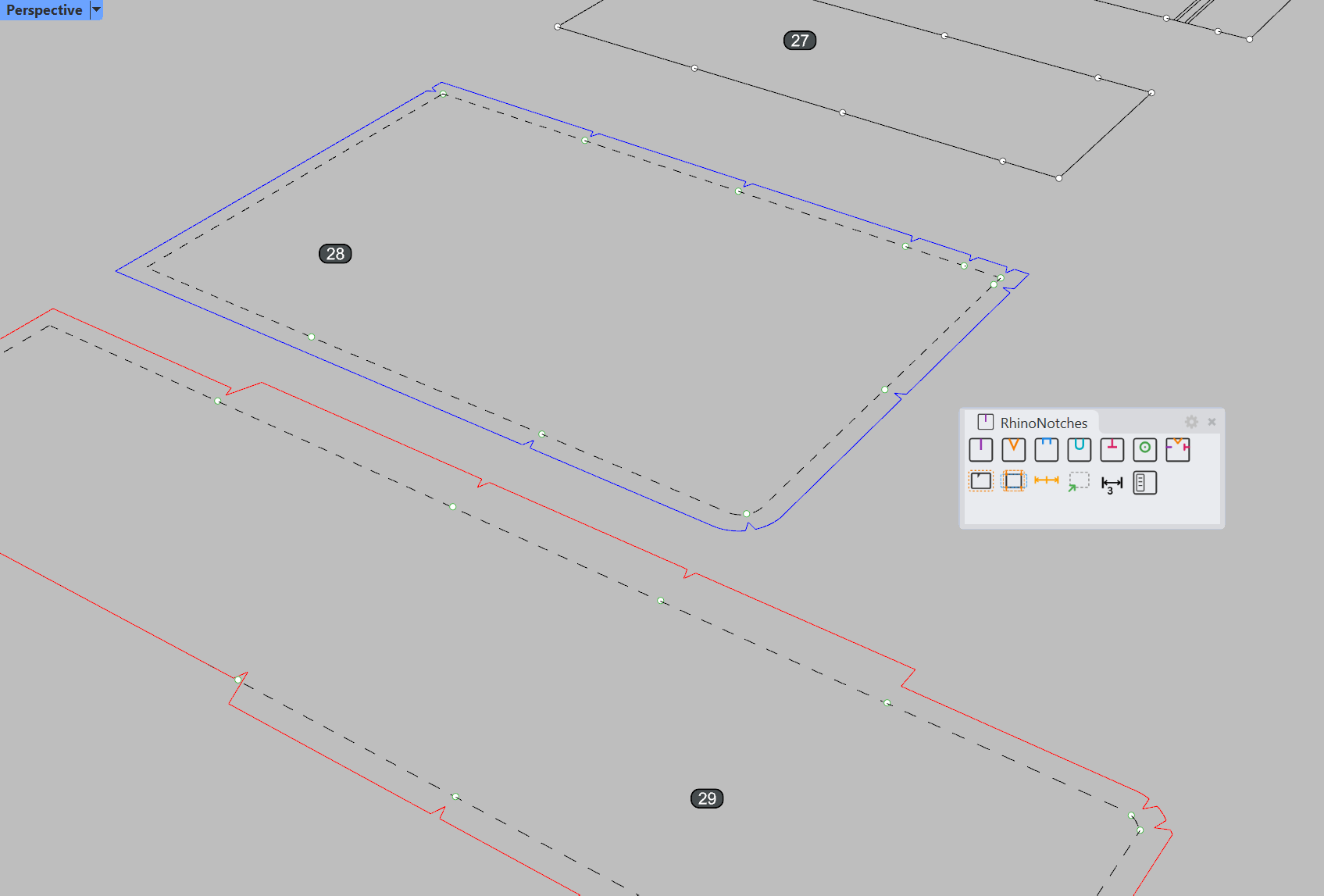
From curve selection to finished notch marks and seam allowances — the entire pattern making process happens inside Rhinoceros.

Capabilities

Features

Every tool you need for production-quality notch placement, built into one plugin.

Six Notch Types

I-notch, V-notch, T-notch, U-notch, External notch, and Drill Hole. Each type generates the correct geometry for its production method — whether you are cutting by hand, on a CNC table, or with a laser.

I-Notch V-Notch T-Notch U-Notch External Drill Hole

Dockable Panel & Persistent Settings

The Eto.Forms dockable panel gives you quick access to every setting without leaving your viewport. Notch depth, angle, spacing threshold, seam allowance width — all adjustable in real time. Settings persist between sessions via JSON.

Dockable Panel JSON Settings Session Persistence

Seam Allowance Tools

Add seam allowances directly on your 2D flattened patterns. The width is adjustable between any two notch points — so hems, zippers, and structural seams each get the exact offset they need within the same curve.

Per-Edge Editing Offset Curve Variable Widths

Smart Validation & Corner Detection

Analyzes tangent direction at each notch location. When adjacent notches would overlap due to a sharp corner, the plugin skips that point and warns you. Threshold angle is fully adjustable.

Tangent Analysis Adjustable Threshold Overlap Prevention

Variable Seam Allowance

Different edges of the same pattern can have different seam widths. Handle hems, zippers, and structural edges with their correct offsets in a single session.

Per-Edge Width Hem Support Flexible Offsets

Restore Original Curve

The plugin tracks which curves have been processed and lets you restore the original boundary with a single command. No need to undo multiple steps or re-import geometry.

Non-Destructive Undo Support Quick Reset
Workflow

How It Works

Six steps from flat pattern to production-ready notched output.

1

Select Curves

Pick one or more closed boundary curves. Pre-selection is fully supported.

2

Choose Notch Type

Select from six types via toolbar, panel, or command line.

3

Set Parameters

Adjust depth, angle, spacing, and seam allowance in the dockable panel.

4

Run Command

One click places all notches at the correct positions and orientations.

5

Review & Adjust

Corner detection warnings appear in the command line. Adjust threshold if needed.

6

Export

Notches are standard Rhino geometry — export to DXF, DWG, PDF, or any supported format.

Industries

Who It's For

Built for professionals who make flat patterns from 3D surfaces for sewing, CNC cutting, and laser cutting production.

Marine Canvas & Boat Upholstery

Boat canopies, covers, biminis, cushions, and marine upholstery. If you are making flat patterns from compound-curved surfaces and need notch marks and target marks for sewing, RhinoNotches was designed for your workflow.

Textile, Fabric & Upholstery

Furniture upholstery, automotive interiors, garment patterns, and custom textile production. Consistent notch mark placement across dozens of pattern pieces means faster sewing assembly and fewer alignment errors.

CNC & Laser Cutting Production

Automated cutting tables and laser cutters need clean, predictable notch geometry. RhinoNotches outputs standard curves and points that export cleanly to DXF, DWG, and other production-compatible formats for fabric and canvas cutting.

“Smarter pattern making workflow in Rhinoceros.”

RhinoNotches is not a general-purpose CAD toolkit. It solves one specific problem — automated notch marks, target marks, and seam allowances for pattern making — and it solves it thoroughly. Every feature exists because a real textile and canvas production workflow demanded it.

Built by a designer with 13+ years of hands-on experience in marine soft goods manufacturing, this plugin reflects the actual needs of people who flatten 3D surfaces, add seam allowances, and cut patterns for a living.

Requirements

Technical Details

Platform Windows — macOS: built for compatibility but not yet verified. Purchase risk-free with 14-day money-back guarantee, or apply as a macOS beta tester.
Rhino Version Rhino 7 & Rhino 8
Runtime .NET Framework 4.8
Install Drag & drop .rhp file
Commands Notches, Notches_3mm, Notches_5mm, VNotches, INotches, TNotches, UNotches, ExternalNotches, DrillHoles, SeamAllowanceNotches, AdjustThreshold, RhinoNotches_Panel
Export DXF, DWG, PDF, AI — any Rhino-supported format
License Single Device Licence (cooldown timer between transfers)

What's New

Latest v1.0.2

DrillHoles Curve mode & TrimEdge, Separate mode defaults, license UX

v1.0.1

Variable Seam Allowance, Mixed Notches, Restore Original Curve, Help system

v1.0.0

Initial release — 6 notch types, settings panel, seam allowance workflow

v1.0.2

New Features

  • DrillHoles: Curve mode with auto-find points near closed curves
  • DrillHoles: TrimEdge merges edge-intersecting holes into boundary
  • DrillHoles: Single-click Mode toggle (Free / Curve)

Improvements

  • I-Notch & T-Notch: Separate mode on by default
  • License check optimized — no repeated prompts
  • Updated built-in help documentation

v1.0.1

New Features

  • Variable Seam Allowance per region
  • Mixed Notches on a single curve
  • Restore Original Curve
  • Measure Segments
  • Built-in searchable help
  • Export / Import settings
  • Embedded toolbar

Improvements

  • Command-line syncs with panel settings
  • Better point detection on curve edges

v1.0.0

Initial Release

  • 6 notch types: I, V, T, U, External, Drill Hole
  • Dockable settings panel & persistent settings
  • Auto-find points & seam allowance workflow
  • Smart corner detection & layer organization
  • 13 commands via toolbar and command line
RhinoNotches

RhinoNotches

From €19/mo

Flexible monthly, annual, and perpetual license options. 14-day money-back guarantee.

View Pricing Plans →

All plans include full features. 14-day money-back guarantee on every purchase.
What's Included

  • All 6 notch types included
  • Flexible seam allowance with variable widths
  • Dockable panel with persistent settings
  • Smart corner detection & validation
  • Rhino 7 and Rhino 8 compatible
  • Free updates within major version
  • Email support

Ready to automate your notching?

From €19/month with 14-day money-back guarantee. Start producing cleaner patterns today.

Back to top